Blaze FastFlags Manager
Apply any Roblox FastFlags you want, live. Comes with Lag Ball, Fps Boost and Low Ping presets.
5.0 (1 rating, 1 automatic)- Your key right after payment, also by email
- The download on your order page, any time
- Setup steps on your order page
- Support by ticket or on Discord


 Crypto


Questions first? Ask us on Discord
Often bought together
 Blaze MacroIn stock
$5.00
 Blaze Triggerbot133 in stock
$10.00
About Blaze FastFlags Manager
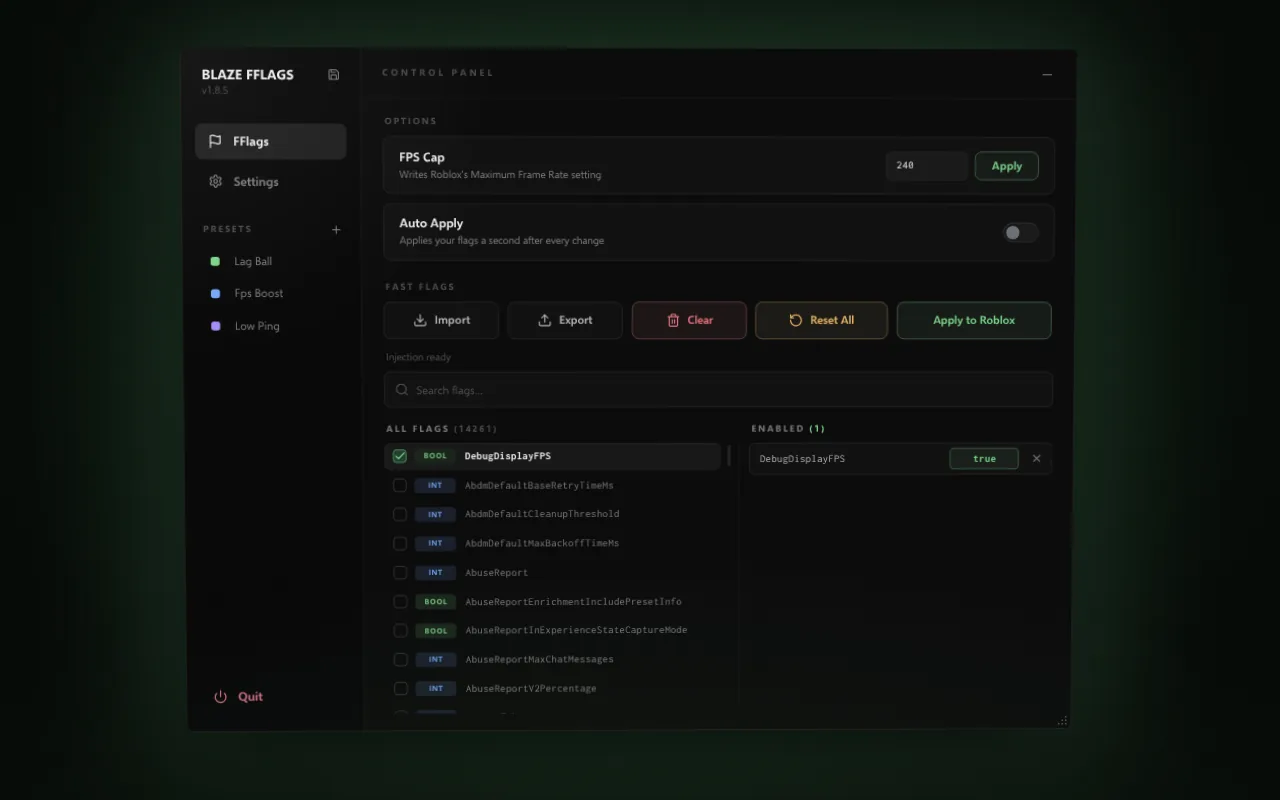
Blaze FastFlags Manager lets you apply any Roblox FastFlags (FFlags) you want, straight into the running game. Search more than 14,000 flags, tick the ones you want, set their values and press Apply to Roblox. No file editing and no restarting.
It comes with three ready presets, Lag Ball, Fps Boost and Low Ping, and everything is yours to customize: change any value, make your own presets with a colour and a keybind, and switch between them in a second, even in game.
One payment, yours for life.
Your flags, your way
Any flag, live
Apply any Roblox FastFlag to the running game with one click, or let Auto Apply do it a second after every change.
14,000+ flags
The full flag list for your Roblox version, with search. Missing one? Type its name and add it.
3 presets included
Lag Ball, Fps Boost and Low Ping are ready to go: load one and apply.
Presets on a key
Make your own presets with a colour and a keybind, and load them anywhere, even in game.
FPS cap
Set your frame rate cap in one box. It writes Roblox's own Maximum Frame Rate setting.
Fully customizable
Change any value, import or export JSON, keep it above Roblox and hide it with a key.
Get started in a minute
Buy and copy your key
It shows on your order page right away and comes by email. It starts with FFLAG.
Download Blaze FFlags
Get BlazeFFlags.exe from your order page and put it in a folder you keep, like Documents.
Run it and paste your key
Windows may say it protected your PC because the app is not code-signed yet. Click More info, then Run anyway, and paste your key.
Apply your flags
Load a preset or tick your own flags, then press Apply to Roblox while Roblox is open.
Details
- Game
- Roblox
- Works on
- Windows 10 and 11
- Flags
- Any FastFlag, with 14,000+ listed
- Presets
- Lag Ball, Fps Boost and Low Ping, plus your own
- Key
- Lifetime
- Version
- 1.8.5
Windows may warn you the first time
Blaze FFlags is not code-signed yet, so Windows can show "Windows protected your PC". Click More info, then Run anyway. The current build is scanned on VirusTotal.
Questions
What are FastFlags?
Settings built into the Roblox client (FFlags) that switch features on or off and tune things like graphics and networking. Blaze FastFlags Manager lists them all and applies the ones you pick.
Can I apply any flag I want?
Yes. Search the list of 14,000+ flags, or type the full name of any flag, like FFlagMyFlag or DFIntMyValue, and press Add. Hide Unavailable Flags in Settings lists only the flags your Roblox version can load.
What do the presets do?
Fps Boost lowers the graphics (textures, grass, effects) for more frames, Low Ping tunes how Roblox sends and receives network packets, and Lag Ball changes how much Roblox smooths and delays moving objects. Open one to see or change its flags, or make your own.
Do I have to restart Roblox?
No. Apply to Roblox works while the game runs, and Always Live in Settings puts your flags back after a restart or a server change. Only the FPS cap needs a restart.
Can I use my ClientAppSettings.json?
Yes. Press Import and paste it or open the file. Export copies or saves your flags as JSON.
Can I hide the window in game?
Yes. Set a Show / Hide Keybind in Settings and press it anywhere. Always On Top keeps the window above Roblox without taking focus from it.
The app says my key is invalid
Copy and paste it exactly, with no spaces. Keys look like FFLAG-XXXXX-XXXXX-XXXXX-XXXXX.
My antivirus removed it
That is a false positive, because the app is not code-signed yet. Restore it from quarantine and add an exclusion for the Blaze FFlags folder only (not your whole PC).
Questions before you buy?
Ask in our Discord. Real people answer, usually within minutes.
Reviews
No written reviews yet.
1 of these is an automatic rating: when a buyer leaves no feedback within 7 days of delivery and has not asked for help, the order is rated 5 stars and marked Automatic.
 2,000